Reports are processed data that users can use to eveluate their operational perfomance.
The differences between Export Jobs and Reports are
- Export Jobs allows users to extract unprocessed/raw data such as when the task is created or when the task is complete etc, while Reports allow users to extract processed data such as how many orders have been completed by a driver or the percentage of orders that are late
- Users are allowed to choose the fields to be exported while the fields in Reports are already fixed
For more information about exporting data, read Exporting Jobs
Downloading Reports
To download reports in VersaFleet,
- Go to Planning > Tasks
- Click the 3 dots on the right and select Download Reports
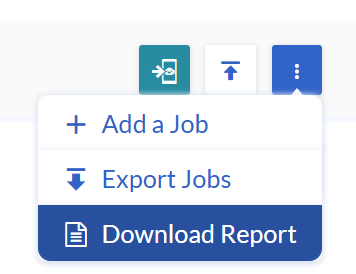
- Define the date range. The maximum date range is 31 days
- Choose a report from the list and click Download Report
- Your request will be processed and the progress can be seen at the bottom left
List of Reports
- COD
- COD Summary of Completed Tasks
- Order Completion
- Order Completion (%)
- Order Completion (%) by driver
- Order Completion (%) by load
- Order Completion (%) by load & by driver
- Order Completion (%) by customer
- Order Completion (%) by account
- Order Completion (%) by task contact person
- Order Completion (%) by zone
- Order Completion (%) by VersaFleet Plan accounts
- Breakdown of Tasks by Status
- Number of Delivery Tasks by Status
- Number of Pickup Tasks by Status
- Incomplete Orders and Incompletion Reasons
- Top Reasons for Incomplete Orders Report
- Incomplete Orders by Drivers
- Incomplete Reasons breakdown
- Incomplete Reasons breakdown by driver
- Incomplete Reasons breakdown by customer
- Incomplete Reasons breakdown by account
- Incomplete Reasons breakdown by task contact person
- Incomplete Reasons breakdown by zones
- Incomplete Reasons breakdown by VersaFleet Plan accounts
- Order Discrepancy
- Order Discrepancy (%)
- Order Discrepancy (%) by driver
- Top Reasons for Complete with Discrepancy
- Discrepancy Reasons Breakdown
- Timeliness
- On-Time Pickup/Delivery (%)
- On-Time Pickup/Delivery (%) by driver
- Late Pickup/Delivery (%)
- Late Pickup/Delivery (%) by driver
- Complete Orders
- Completion by Location (%)
- Completion by Location (%) by driver
- Carbon Emissions
- Carbon Emissions by Day
- Carbon Emissions by Vehicle
- Carbon Emissions by Task
Do you have a suggestion for a report? Let us know by writing to support@versafleet.co