At any point in time, each task will have its status. In this article, you'll learn about the task statuses in VersaFleet and VersaDrive.
Definition of Task Statuses
| Task Status | Description | Triggered by | Triggered in |
| Unassigned |
|
| VersaFleet |
| Assigned | When the task has been assigned to a driver | When the user assigns the task to a driver | VersaFleet |
| Waiting for Acknowledgement | When the task is awaiting acknowledgement from the driver | When the user clicks 'Update VersaDrive' button in Planning > Map or Planning > Tasks after the task is assigned to a driver This is only triggered if Driver Acknowledgement (Settings > VersaDrive > Driver Acknowledgement) is enabled. This status will be skipped if Driver Acknowledgement is disabled. | VersaFleet |
| Acknowledged |
|
|
|
| Declined | When the driver did not acknowledge the task | When the driver did not click 'Approve' in New Jobs of VersaFleet Drive This is only triggered if Driver Acknowledgement is enabled. | VersaDrive |
| Collected | When the driver has collected the task | When the driver clicks 'Collect' | VersaDrive |
| Started | When the driver starts the task | When the driver clicks 'Start' This is only triggered if Driver Started (Settings > VersaDrive > Driver Started) is enabled. This status will be skipped if Driver Started is disabled. | VersaDrive |
| Arrived | When the driver has arrived at the location | When the driver swipes 'Arrived' | VersaDrive |
| Complete (Successful) | When the driver has successfully completed the task | When the driver clicks 'Complete' | VersaDrive |
| Incomplete (Failed) | When the driver has not completed the task successfully | When the driver clicks 'Incomplete' | VersaDrive |
| Cancelled | When the task is cancelled | When the user cancels the task | VersaFleet |
Status Flow in Delivery and Pickup Jobs
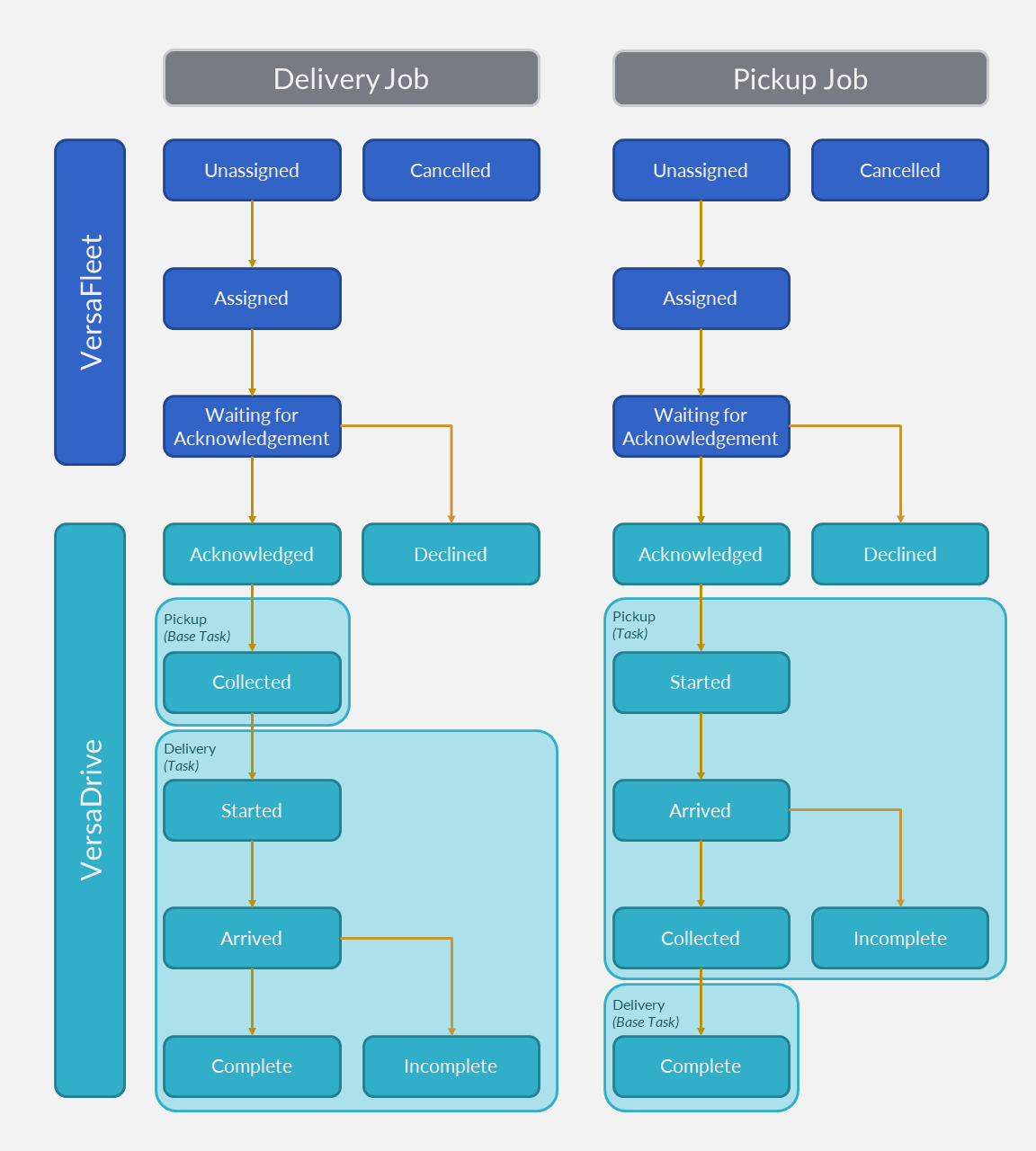
The following diagram illustrates the status flow for both Delivery and Pickup Jobs, with both Driver Acknowledgement and Driver Started enabled.