Searching in VersaFleet is a great way to quickly locate Jobs, Tasks, Vehicles, VersaDrivers and Customers within your account.
Global & Local Search Bars
The global search bar sits at the top-right corner in your account and is always there even if you switch between different modules or tabs within VersaFleet™.

The local search bar is located below the tabs of Planning, Fleet Management, and Customers and it searches specifically within the tab that you're in.
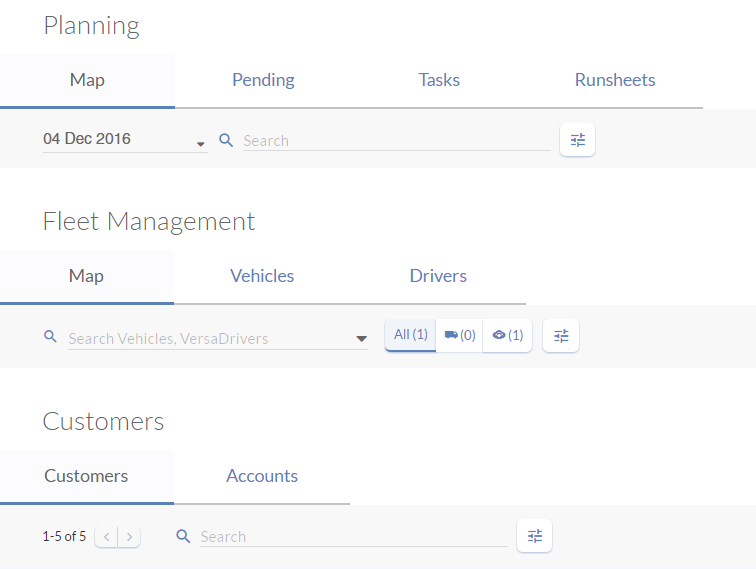
Searchable Fields
Depending on which search bar you use, the searchable fields are different.
| Search Bar | Searchable fields |
| Global Search Bar | Job IDs, Task IDs or Tracking IDs |
| Local Search Bar In Planning (Multiple search terms supported) In Fleet Management In Customers (Customers) In Customers (Accounts) | Customer Name, Address, Tags, Invoice Number or Assigned Driver Vehicle Plate Number or VersaDrivers Customer Name, Contact Person or Contact Person Number Account Name, Address, Postal Code, Contact Person or Contact Person Number |
Refine using filters
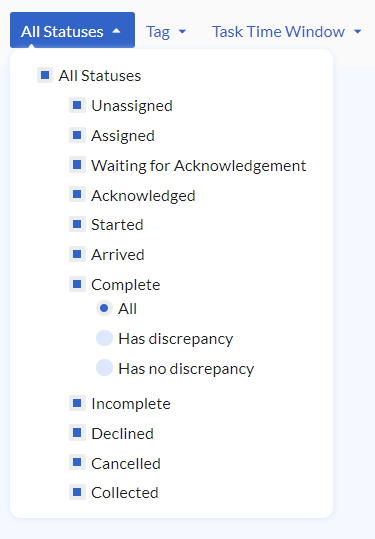
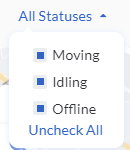
You can use the filters to narrow your search results based on task statuses in Planning (Map & Tasks) or vehicle statuses in Fleet Management (Map).
In Planning > Map or Tasks, check the boxes to filter tasks based on task statuses. You may check multiple boxes.
In Fleet Management > Map, the statuses in the filter apply only to the vehicles.
Sort by fields
You can sort information based on various fields in Planning (Tasks), Fleet Management (Vehicles & Drivers) and Customers (Customers & Accounts).
| Page | Sort by |
| In Planning (Tasks) | Task ID, when it was Created at or Task Time |
| In Fleet Management (Vehicles) In Fleet Management (Drivers) | Vehicle ID, when it was Updated at or Plate Number Driver ID, when it was Updated at or Name |
| In Customers (Customers) In Customers (Accounts) | Customer ID, when it was Updated at or Name Account ID, when it was Updated at or Name |
Task ID, Vehicle ID, Driver ID, Customer ID and Account ID refer to a unique reference number generated by VersaFleet™.