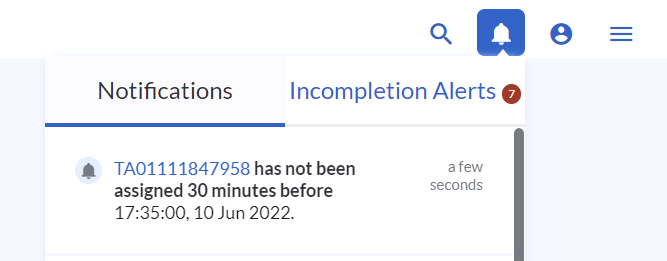
Alert rules are in-app notifications that allow users to be notified about a task's status with respect to task time. They can be treated as reminders so that users can take action on the task.
Alert Rules are different from SMS and Email Triggers where users will be notified when a task status has changed.
To configure Alert Rules,
- Go to Settings > Notifications > Alert rules
- To add new Alert rules, hit + Add New Rules and configure the Alert rule
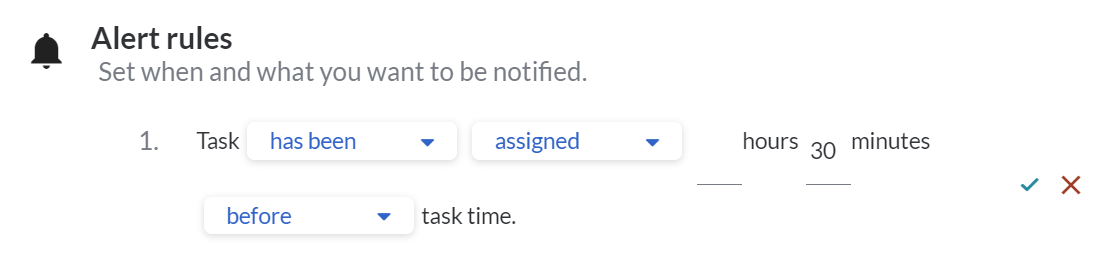
- The rule is structured in a way where you are able to select the options from the dropdown lists.
- Task {has been / has not been} {Task Status} ___ hours/minutes {before / after} task time.
- Task Statuses
- assigned
- submitted
- acknowledged
- started
- collected
- arrived at
- completed
- Task Time refers to the time range of the task
- 'before' will make reference to the start of the time range
- 'after' will make reference to the end of the time range
- For example, if you want the system to remind you about assigning tasks 30 minutes before the task time, you can set the Alert rule as
- Task has not been assigned 30 minutes before task time.
- Task {has been / has not been} {Task Status} ___ hours/minutes {before / after} task time.
- Click the tick button to save the Alert rule
When there is a task that meets the conditions set in the Alert Rule, you will receive notifications from the Notification Bell at the top right.